✨ Convert Social Media Links Into Discord-Embeddable Formats


 📍 Author GitHub | Script Repository
Transform links from Twitter/X, Reddit, Instagram, TikTok, and 8+ other platforms into formats that display previews in Discord—with automatic tracking cleanup.
💡 Overview
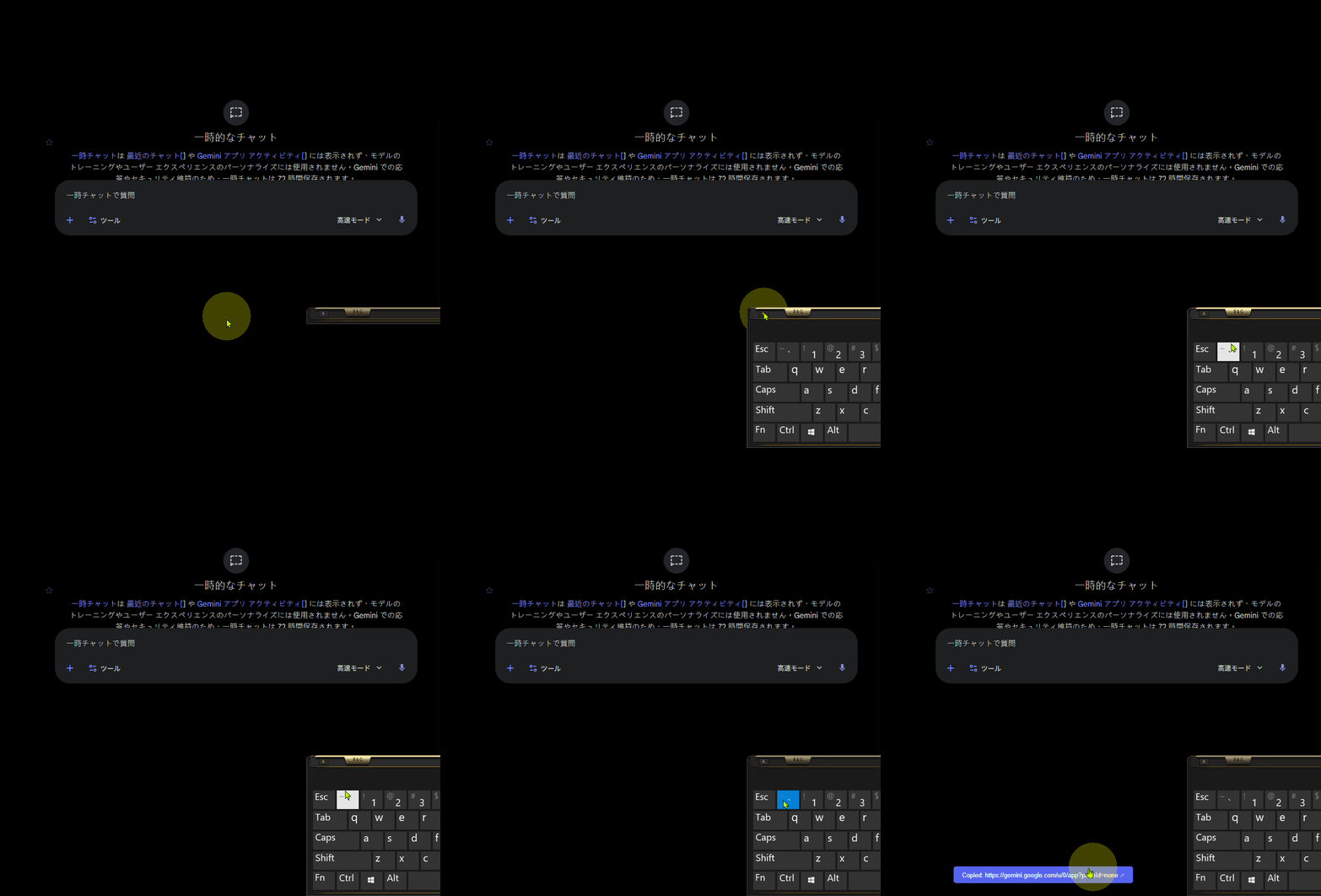
This script detects social media links on any webpage and converts them to embed-friendly alternatives. When you double-press the backtick key (or use a custom keyboard shortcut), the script finds all convertible links on the page: if there's exactly one, it copies directly to your clipboard; if there are multiple, a selection panel opens so you can choose which format to use. The script also removes tracking parameters automatically and remembers your last-used format per site.
Hide image
🎛 Getting Started
After installation, the script activates on every webpage automatically.
Trigger the conversion panel in three ways:
- Double-press the backtick key (
- Set a global keyboard shortcut — Customize in the Settings panel (e.g.,
Ctrl+Shift+L)
- Open the menu button — A "🛠️ Open Link Conversion Panel" entry appears in your userscript manager
When triggered:
- If the current page has exactly one convertible link, it copies instantly (no panel shown)
- If multiple convertible links exist, a panel opens where you select which format to copy
🚀 Core Features
🔍 Multi-Platform Link Detection
Automatically identifies and converts links from:
- Twitter / X (to
fixupx.com, vxtwitter.com, and other X-specific mirrors)
- Reddit (to
rxddit.com, old.reddit.com)
- Instagram (to
ddinstagram.com)
- TikTok (to
vxtiktok.com, tiktok-downloader services)
- Threads (to embed-compatible format)
- Pixiv (to preview-friendly domains)
- Bilibili (to iframe embed format)
- Facebook (to
facebook.com or proxy format)
- Tumblr (to standard domain)
- YouTube Shorts (to full YouTube URL)
- Bluesky (to embed-compatible format)
Each platform has multiple target formats configured. When you trigger the conversion, you can pick which embed service to use.
📋 Smart Single-Copy
If the page has only one convertible link, the script copies it directly to your clipboard without opening a panel.
- Works with links that are already in the page HTML
- Automatically detects when only one conversion target exists
- Shows a copy notification when complete
🔀 Bidirectional Conversion
Convert links back and forth between original and embed domains.
- If a link is already in embed format (e.g.,
fixupx.com), the script offers to convert it back to the original domain (twitter.com)
- Useful if you need the canonical link after copying an embed version
🧹 Automatic Tracking Cleanup
All copied links have tracking parameters removed.
- Strips
utm_*, ref=, s=, and other analytics identifiers
- Creates cleaner, privacy-friendly links
- Works transparently — you don't need to configure anything
💾 Last-Used Format Memory
The script remembers which embed format you used most recently on each website.
- When opening the conversion panel, your last-used format appears at the top with a "Last used" badge
- That format is also pre-copied to your clipboard automatically
- Makes repetitive copying much faster
🔐 Site Preference System
After using a format on a site multiple times, you can tell the script to always use that format without showing the panel.
- In the selection panel, check the box: "Always use this format for this site (skip panel)"
- Next time you trigger the conversion on that site, it copies directly without any UI
- Manage all your site preferences in the Settings panel
📤 Custom Domain Rules
Add your own source → target domain pairs in the Settings panel.
- Example: Convert
mycompany.com links to mycompany-mirror.com
- Your custom rules layer on top of the built-in platform rules
- Edit, delete, or view all your custom rules in one place
🔗 Jump Links & Quick Navigation
Hide image
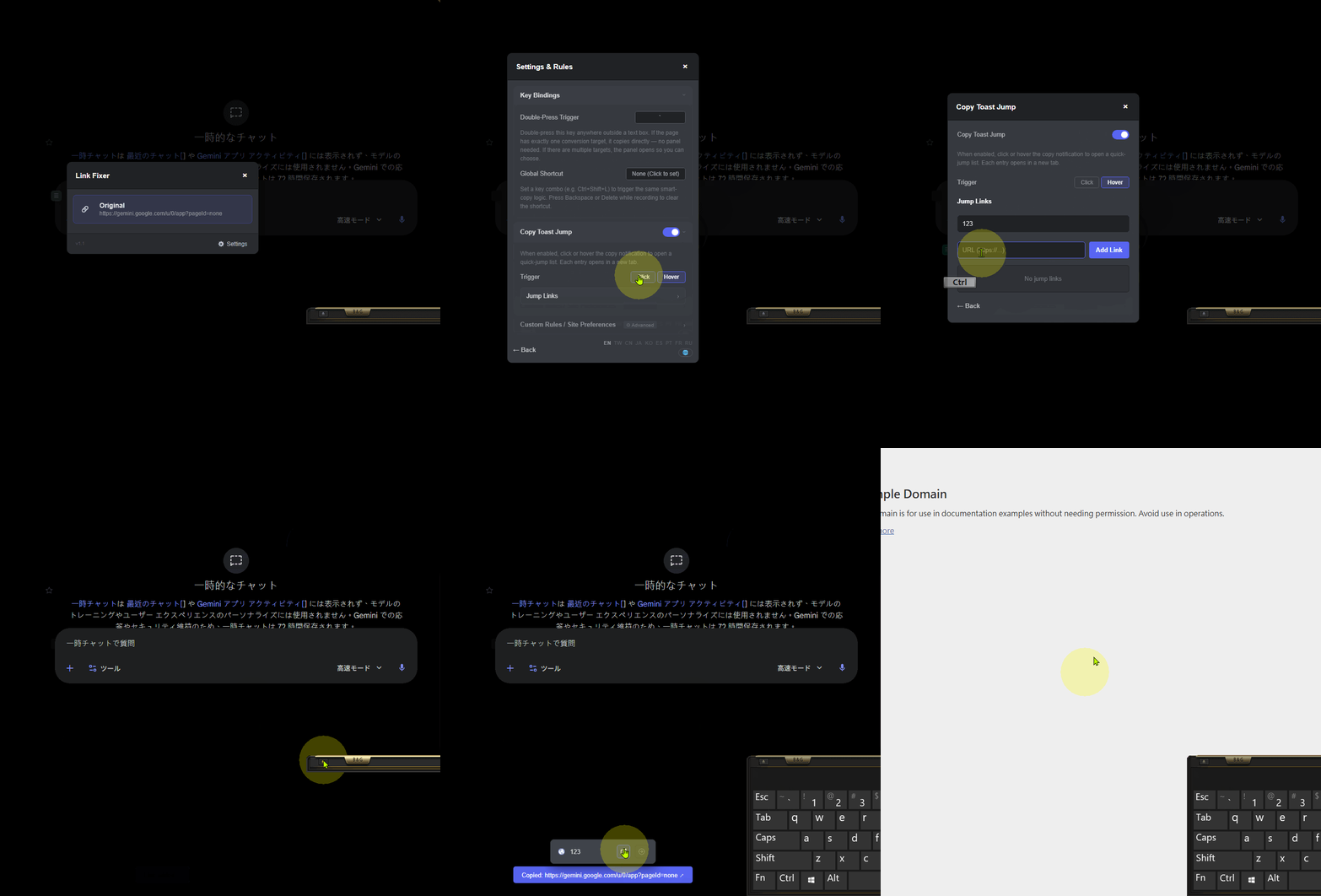
Create a custom list of websites that appear in a popup menu when you copy a link.
- After the copy notification appears, click or hover the notification (depending on your settings)
- A list of quick-jump links opens — click any to open that site in a new tab
- Useful for keeping your favorite link-analysis tools, archiving services, or proxy sites always one click away
- Manage jump links in Settings: add name, URL, enable/disable each one
⬆️ Copy Toast Jump
The copy notification can trigger a jump menu, letting you navigate to related services instantly.
- Trigger modes: Click the notification to show the menu, or hover to auto-show
- Jump link management: Add, edit, enable/disable custom jump links
- Configurable in the Settings panel
⚠️ Experimental Features & Known Limitations
Important Usage Notice
This script converts links to third-party service URLs (e.g., fixupx.com, vxtwitter.com). Before using, please understand:
- Server/Channel Rules: Make sure your Discord server or channel allows this type of link conversion. Some communities prefer original links.
- Preview Changes: Third-party services may alter how link previews appear compared to the original platform. Users may see slightly different preview images, descriptions, or formatting.
- Community Impact: Respect other members' reading experience. Check whether converting links disrupts notifications or normal channel usage for others.
- Service Terms: Third-party mirror services have their own terms of service and privacy policies. Review them if you plan to use this script regularly.
Known Constraints
- Platform Coverage: Not all social media platforms are supported. If a platform isn't on the list above, the script ignores links from that platform.
- Dynamic Content: Links added to the page after it loads (via JavaScript) may not be detected immediately. Trigger the conversion again after the page updates.
- CSP Restrictions: On pages with strict Content Security Policy, some features may be limited or unavailable.
- Selection Panel Timeout: If you don't select a format within a few seconds, the panel closes automatically.
⚙️ Additional Features
Keyboard Shortcut Customization
In the Settings panel, under "Key Bindings," you can:
- Set a Global Shortcut (e.g.,
Ctrl+Shift+L) to trigger the same smart-copy logic as double-pressing backtick
- Record the shortcut by clicking "None (Click to set)" and pressing your desired key combo
- Press Backspace or Delete while recording to clear the shortcut
- The shortcut works even when you're in a text box, unlike the backtick trigger
Custom Rules Management
Create platform-specific conversion rules:
- Add Rule: In Settings, input a source domain (e.g.,
youtube.com) and target domain (e.g., yewtu.be)
- View & Delete: All custom rules are listed; click to delete any rule
- Stacking: Your rules apply on top of built-in platform rules, so you can override defaults if needed
Site Preferences Dashboard
In Settings, under "Site Preferences," review and manage all your remembered preferences:
- See which sites have a "skip panel" preference enabled
- Click any entry to clear that preference
- Re-enable the panel for that site at any time
Multi-Language Support
The script includes translations in:
- English (EN)
- Traditional Chinese (TW)
- Simplified Chinese (CN)
- Japanese (JA)
- Korean (KO)
- Spanish (ES)
- Portuguese (PT)
- French (FR)
- Russian (RU)
Language is detected automatically from your browser settings, but you can override it in the Settings panel.
Footer
- This userscript is primarily maintained on Greasy Fork.
- Built with AI assistance by a hobbyist developer. Bug fixes and updates may not be immediate.
- Feedback is welcome. Responses may be assisted by translation tools if needed.


