Github Deployments and Repository Dispatch Trigger

Trigger deployment or repository_dispatch event for Github Actions

K instalaci tototo skriptu si budete muset nainstalovat rozšíření jako Tampermonkey, Greasemonkey nebo Violentmonkey.

You will need to install an extension such as Tampermonkey to install this script.

K instalaci tohoto skriptu si budete muset nainstalovat rozšíření jako Tampermonkey nebo Violentmonkey.

K instalaci tohoto skriptu si budete muset nainstalovat rozšíření jako Tampermonkey nebo Userscripts.

You will need to install an extension such as Tampermonkey to install this script.

K instalaci tohoto skriptu si budete muset nainstalovat manažer uživatelských skriptů.

(Už mám manažer uživatelských skriptů, nechte mě ho nainstalovat!)

You will need to install an extension such as Stylus to install this style.

You will need to install an extension such as Stylus to install this style.

You will need to install an extension such as Stylus to install this style.

You will need to install a user style manager extension to install this style.

You will need to install a user style manager extension to install this style.

You will need to install a user style manager extension to install this style.

(Už mám manažer uživatelských stylů, nechte mě ho nainstalovat!)

Autor
Te Qi
Denně instalací
0
Celkem instalací
141
Hodnocení
1 0 0
Verze
0.3
Vytvořeno
21. 12. 2019
Aktualizováno
25. 12. 2019
Size
5,1 KB
Licence
neuvedeno
Spustit na

Github Deployments and Repository Dispatch Trigger

A Tampermonkey userscript for triggering Github deployments and repository dispatch event with one click

Screenshot Screenshot Screenshot

Prerequisite

Tampermonkey / Greasemonkey

Usage

  1. Install Tampermonkey or Greasemonkey in your favorite browser.
  2. Install the script from Greasefork (Recommended, as you can receive updates) or by copying.
  3. Get github personal access token with repo permissions. Copy it.
  4. Open the repo you want to trigger deployments or repo dispatch event.

For repository_dispatch event

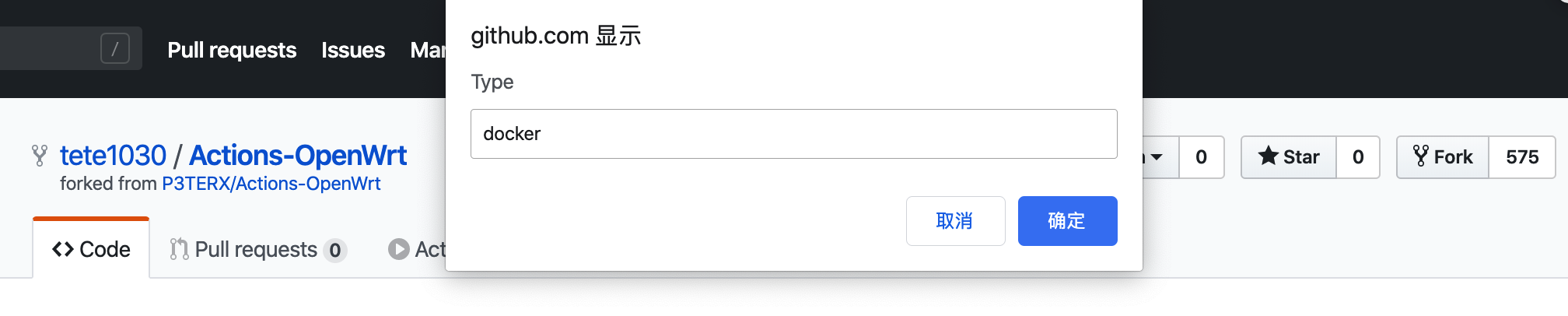
  1. Click the "Repo Dispatch" button.
  2. At the first time, you will be asked to input your personal access token.
  3. Input your dispatch type (or any name you want. The name can be used to identify the event in Github Actions).
  4. Input your dispatch payload (optional, in json. E.g. {"debug": true}).

For deployments event

  1. Click the "Deploy" button.
  2. At the first time, you will be asked to input your personal access token.
  3. Input the ref for your deploy, it can be branches/tags/commits
  4. Input your task name (or any name you want. The name can be used to identify the event in Github Actions).
  5. Input your dispatch payload (optional, in json. E.g. {"debug": true}).

Documentations
