FA Embedded Image Viewer

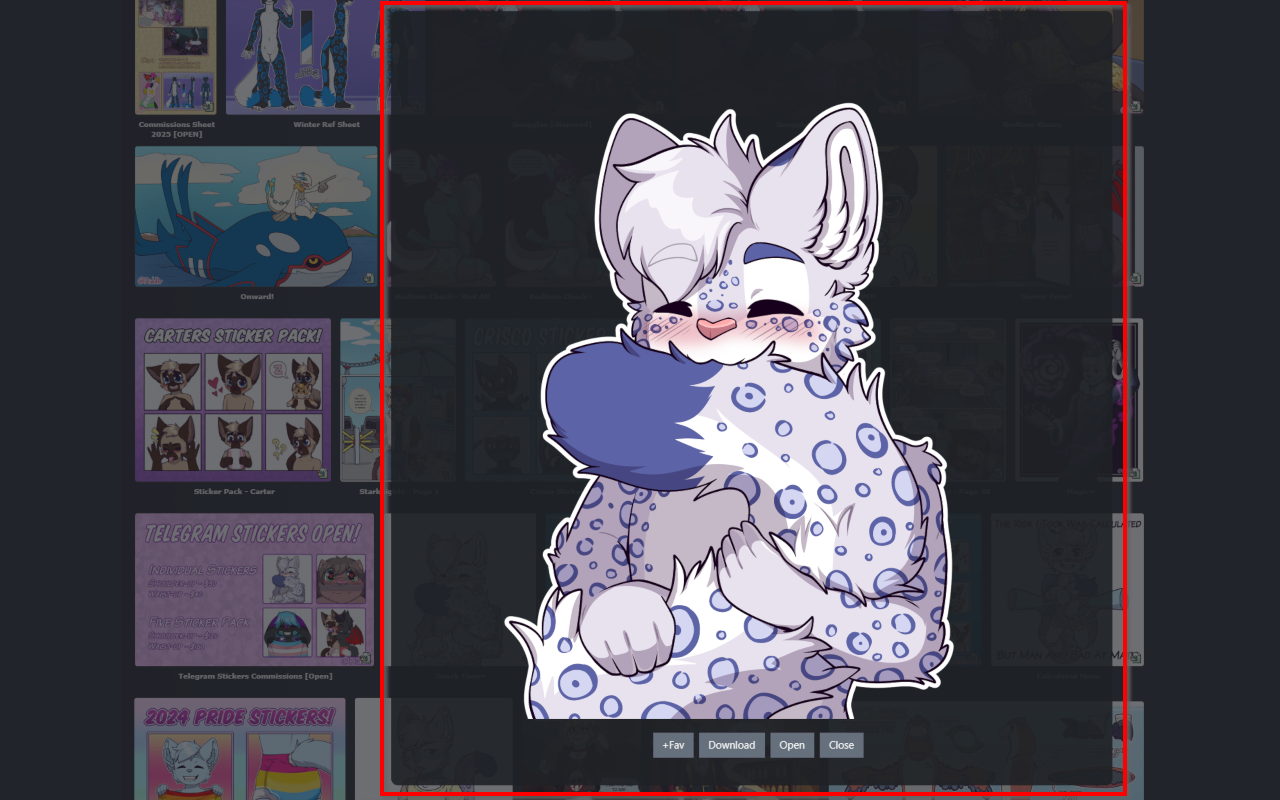
Embeds the clicked Image on the Current Site, so you can view it without loading the submission Page

θα χρειαστεί να εγκαταστήσετε μια επέκταση όπως το Tampermonkey, το Greasemonkey ή το Violentmonkey για να εγκαταστήσετε αυτόν τον κώδικα.

You will need to install an extension such as Tampermonkey to install this script.

θα χρειαστεί να εγκαταστήσετε μια επέκταση όπως το Tampermonkey ή το Violentmonkey για να εγκαταστήσετε αυτόν τον κώδικα.

θα χρειαστεί να εγκαταστήσετε μια επέκταση όπως το Tampermonkey ή το Userscripts για να εγκαταστήσετε αυτόν τον κώδικα.

You will need to install an extension such as Tampermonkey to install this script.

Θα χρειαστεί να εγκαταστήσετε μια επέκταση διαχείρισης κώδικα χρήστη για να εγκαταστήσετε αυτόν τον κώδικα.

(Έχω ήδη έναν διαχειριστή κώδικα χρήστη, επιτρέψτε μου να τον εγκαταστήσω!)

You will need to install an extension such as Stylus to install this style.

You will need to install an extension such as Stylus to install this style.

You will need to install an extension such as Stylus to install this style.

You will need to install a user style manager extension to install this style.

You will need to install a user style manager extension to install this style.

You will need to install a user style manager extension to install this style.

(Έχω ήδη έναν διαχειριστή στυλ χρήστη, επιτρέψτε μου να τον εγκαταστήσω!)

Δημιουργός
Midori Dragon
Ημερήσιες εγκαταστάσεις
0
Σύνολο εγκαταστάσεων
256
Βαθμολογίες
0 0 0
Έκδοση
2.5.12
Δημιουργήθηκε την
27/01/2023
Ενημερώθηκε την
11/05/2026
Μέγεθος
40 KB
Άδεια
MIT
Εφαρμόζεται σε

FA Embedded Image Viewer

A userscript/browser extension that enhances image viewing on FurAffinity by providing an embedded image viewer. When any submission is clicked, instead of opening the page this script will embedd the clicked image on the current site.

See documentation on FA-Embedded-Image-Viewer.
How to use

  • Load this script from GreasyFork or use it inside the browser extensions
  • The viewer automatically handles:
    • Image loading and display
    • Loading animations
    • Quality settings
    • various buttons and options on the embedded page
  • To use just click on any submission and it will be embedded on the current page

Feature Roadmap

Feature Status
Embedded image viewer ✅ Completed
Preview quality settings ✅ Completed
Loading animations ✅ Completed
New tab opening ✅ Completed
Download functionality ✅ Completed
Zooming and panning ✅ Completed

Settings

  • openInNewTab - Whether to open images in a new tab (default is true)
  • loadingSpinSpeedFav - Controls the speed of the favorite loading animation (default is 600)
  • loadingSpinSpeed - Controls the speed of the loading animation (default is 1000)
  • closeEmbedAfterOpen - Whether to close the embed after opening in new tab (default is true)
  • previewQuality - Controls the quality of the preview image. Options: Auto detect, Lower (200px), Low (300px), Medium (400px), High (500px), Higher (600px) (default is Auto detect)
  • enableInMinigallery - Whether to enable the embedded image viewer in the Mini-Gallery on the Submission page (default is true)
  • showWatchingInfo - Controls whether to show if the user is watching the Submissions Author (default is false)