GitHub Collapse In Comment

A userscript that adds a header that can toggle long code and quote blocks in comments

Tendrás que instalar una extensión para tu navegador como Tampermonkey, Greasemonkey o Violentmonkey si quieres utilizar este script.

You will need to install an extension such as Tampermonkey to install this script.

Necesitarás instalar una extensión como Tampermonkey o Violentmonkey para instalar este script.

Necesitarás instalar una extensión como Tampermonkey o Userscripts para instalar este script.

Necesitará instalar una extensión como Tampermonkey para instalar este script.

Necesitarás instalar una extensión para administrar scripts de usuario si quieres instalar este script.

(Ya tengo un administrador de scripts de usuario, déjame instalarlo)

Necesitará instalar una extensión como Stylus para instalar este estilo.

Necesitará instalar una extensión como Stylus para instalar este estilo.

Necesitará instalar una extensión como Stylus para instalar este estilo.

Necesitará instalar una extensión del gestor de estilos de usuario para instalar este estilo.

Necesitará instalar una extensión del gestor de estilos de usuario para instalar este estilo.

Necesitará instalar una extensión del gestor de estilos de usuario para instalar este estilo.

(Ya tengo un administrador de estilos de usuario, déjame instalarlo)

Autor
Mottie
Instalaciones diarias
0
Instalaciones totales
115
Calificaciones
6 0 0
Versión
1.0.23
Creado
27/6/2016
Actualizado
17/2/2024
Tamaño
6,85 KB
Licencia
MIT
Funciona en

A userscript that adds a header that can toggle long code and quote blocks in comments

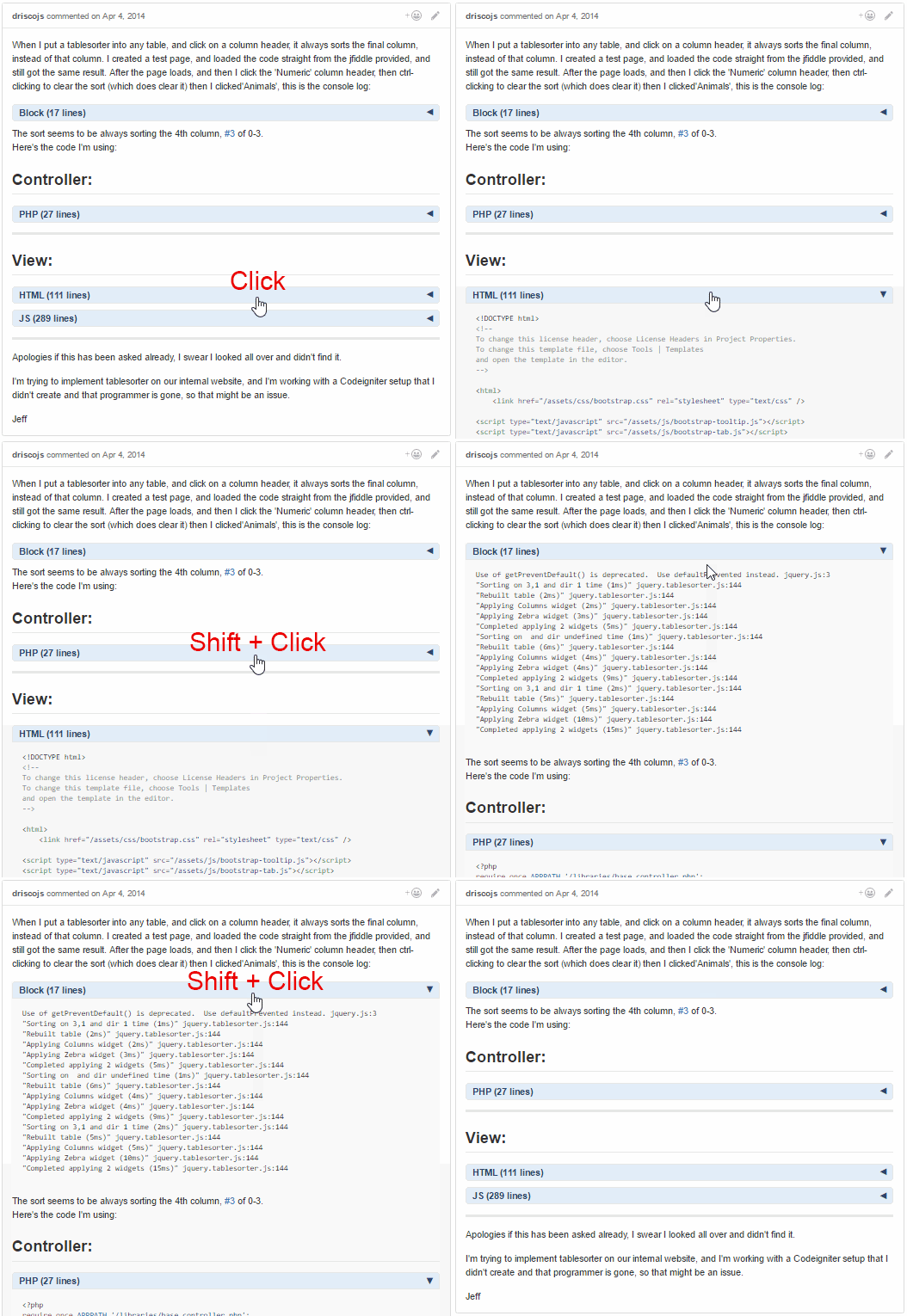
  • The block header:
    • Allows the toggling of the long code & quote block views.
    • Includes the code language based on the syntax highlighting class name; if highlighting is not applied, "Block" is used as the default name.
    • Includes the number of lines within the block.
    • Click the header to toggle the view of the content immediately below the header.
    • Use Shift + Click to toggle all the view of all blocks within the same issue comment.
  • Can be used along with the [[GitHub-collapse-markdown]] userscript.
  • Use the userscript addon to change these settings (see screenshot below):
    • "Set GitHub Collapse in Comment Max Lines" to the number of lines within a block needed to add a header (set to 10 by default).
    • "Set GitHub Collapse in Comment Initial State" to expanded to not have the blocks initially collapsed (collapsed by default).
    • After changing either option, make sure to reload the page (Shift + F5) to have the updated setting take effect.

Hosted with ♥ at GitHub