GitHub to DeepWiki

One click jump from GitHub to DeepWiki

スクリプトをインストールするには、Tampermonkey, GreasemonkeyViolentmonkey のような拡張機能のインストールが必要です。

You will need to install an extension such as Tampermonkey to install this script.

スクリプトをインストールするには、TampermonkeyViolentmonkey のような拡張機能のインストールが必要です。

スクリプトをインストールするには、TampermonkeyUserscripts のような拡張機能のインストールが必要です。

このスクリプトをインストールするには、Tampermonkeyなどの拡張機能をインストールする必要があります。

このスクリプトをインストールするには、ユーザースクリプト管理ツールの拡張機能をインストールする必要があります。

(ユーザースクリプト管理ツールは設定済みなのでインストール!)

このスタイルをインストールするには、Stylusなどの拡張機能をインストールする必要があります。

このスタイルをインストールするには、Stylus などの拡張機能をインストールする必要があります。

このスタイルをインストールするには、Stylus tなどの拡張機能をインストールする必要があります。

このスタイルをインストールするには、ユーザースタイル管理用の拡張機能をインストールする必要があります。

このスタイルをインストールするには、ユーザースタイル管理用の拡張機能をインストールする必要があります。

このスタイルをインストールするには、ユーザースタイル管理用の拡張機能をインストールする必要があります。

(ユーザースタイル管理ツールは設定済みなのでインストール!)

このスクリプトの質問や評価の投稿はこちら通報はこちらへお寄せください
作者
nexmoe
1日のインストール数
0
累計インストール数
71
評価
2 0 0
バージョン
1.0
作成日
2025/04/28
更新日
2025/04/28
大きさ
5.07KB
ライセンス
不明
対象サイト

GitHub to DeepWiki

一个简单高效的油猴脚本,可以在任何 GitHub 仓库页面添加一键跳转到 DeepWiki 的链接。

Description | 描述

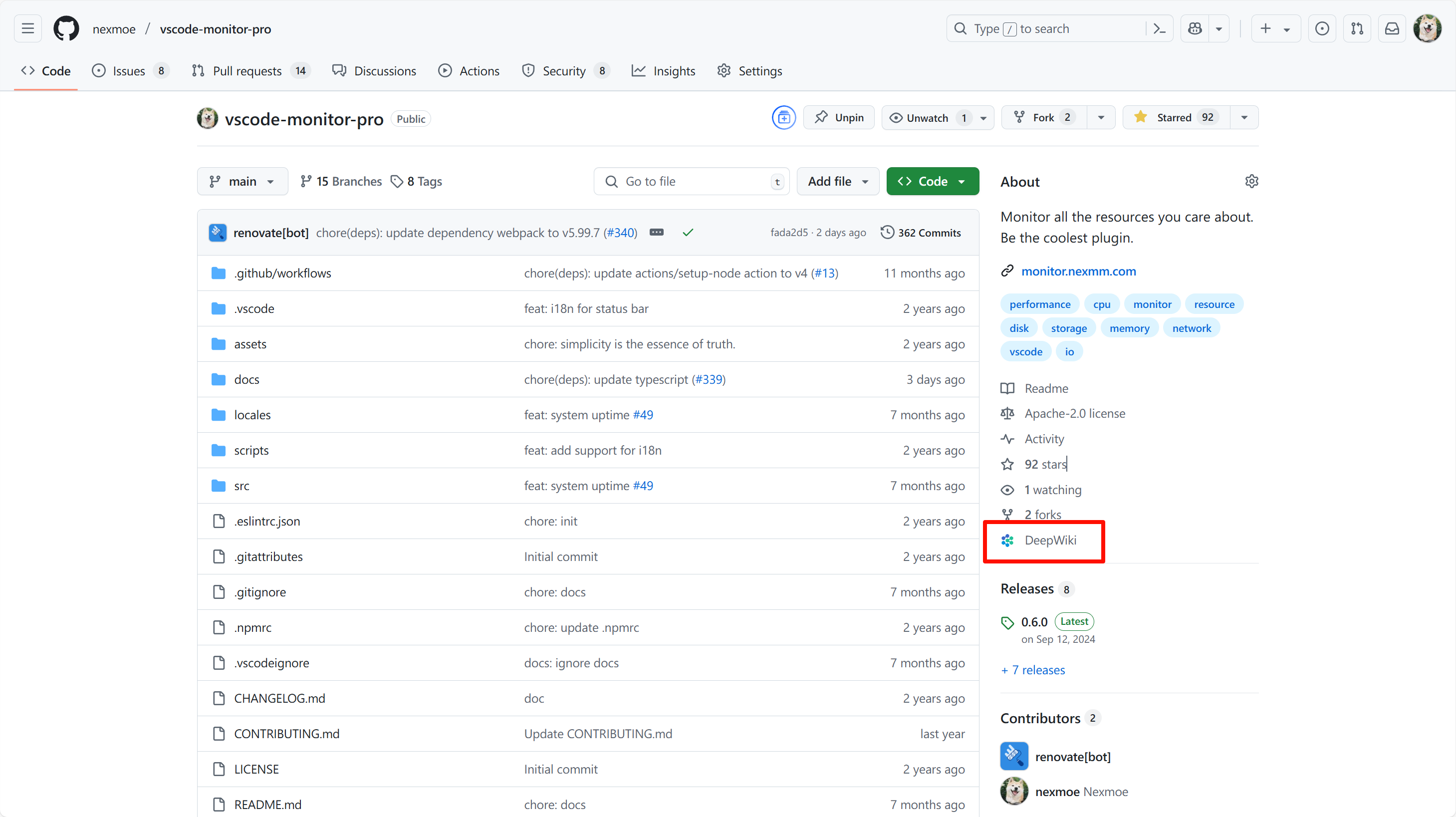
This userscript automatically adds a "DeepWiki" link to GitHub repository pages, allowing users to quickly navigate to the corresponding DeepWiki page with a single click. The link appears in the repository's about section, making it easily accessible while browsing GitHub.

这个油猴脚本会自动在 GitHub 仓库页面添加一个 "DeepWiki" 链接,让用户只需点击一下就能快速跳转到对应的 DeepWiki 页面。链接会出现在仓库的简介部分,使得在浏览 GitHub 时能够轻松访问。
6bdeb6b64ea67a03002d7e240dcc37b0.png

Features | 功能特点

  • Automatically adds a DeepWiki link to GitHub repository pages
  • Maintains GitHub's visual style with a custom icon
  • Simple and lightweight implementation
  • No additional permissions required

  • 自动在 GitHub 仓库页面添加 DeepWiki 链接

  • 使用自定义图标保持 GitHub 的视觉风格

  • 简单轻量的实现

  • 无需额外权限

Installation | 安装

  1. Install a userscript manager extension for your browser:

  2. Click the following link to install the script:

  3. 为你的浏览器安装油猴脚本管理器扩展:

  4. 点击以下链接安装脚本:

Usage | 使用方法

  1. Navigate to any GitHub repository page
  2. Look for the "DeepWiki" link in the repository's about section
  3. Click the link to open the corresponding DeepWiki page in a new tab

  4. 访问任意 GitHub 仓库页面

  5. 在仓库简介部分找到 "DeepWiki" 链接

  6. 点击链接在新标签页中打开对应的 DeepWiki 页面

Contributing | 贡献

Contributions are welcome! Please feel free to submit a Pull Request.

欢迎贡献!请随时提交 Pull Request。