Github Deployments and Repository Dispatch Trigger

Trigger deployment or repository_dispatch event for Github Actions

이 스크립트를 설치하려면 Tampermonkey, Greasemonkey 또는 Violentmonkey와 같은 확장 프로그램이 필요합니다.

You will need to install an extension such as Tampermonkey to install this script.

이 스크립트를 설치하려면 Tampermonkey 또는 Violentmonkey와 같은 확장 프로그램이 필요합니다.

이 스크립트를 설치하려면 Tampermonkey 또는 Userscripts와 같은 확장 프로그램이 필요합니다.

이 스크립트를 설치하려면 Tampermonkey와 같은 확장 프로그램이 필요합니다.

이 스크립트를 설치하려면 유저 스크립트 관리자 확장 프로그램이 필요합니다.

(이미 유저 스크립트 관리자가 설치되어 있습니다. 설치를 진행합니다!)

이 스타일을 설치하려면 Stylus와 같은 확장 프로그램이 필요합니다.

이 스타일을 설치하려면 Stylus와 같은 확장 프로그램이 필요합니다.

이 스타일을 설치하려면 Stylus와 같은 확장 프로그램이 필요합니다.

이 스타일을 설치하려면 유저 스타일 관리자 확장 프로그램이 필요합니다.

이 스타일을 설치하려면 유저 스타일 관리자 확장 프로그램이 필요합니다.

이 스타일을 설치하려면 유저 스타일 관리자 확장 프로그램이 필요합니다.

(이미 유저 스타일 관리자가 설치되어 있습니다. 설치를 진행합니다!)

작성자
Te Qi
일일 설치 수
0
총 설치 수
141
평점
1 0 0
버전
0.3
생성일
2019-12-21
갱신일
2019-12-25
크기
5.14KB
라이선스
해당 없음
적용 사이트

Github Deployments and Repository Dispatch Trigger

A Tampermonkey userscript for triggering Github deployments and repository dispatch event with one click

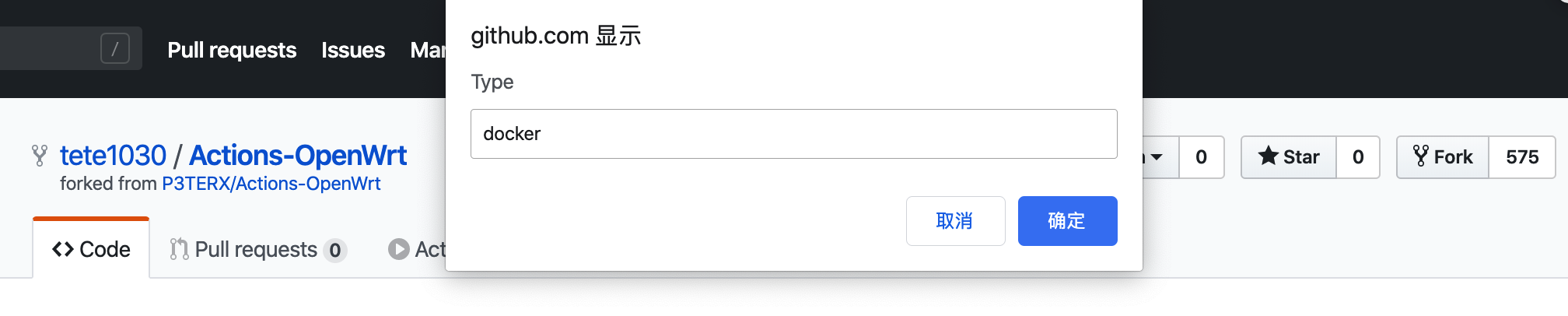
Screenshot Screenshot Screenshot

Prerequisite

Tampermonkey / Greasemonkey

Usage

  1. Install Tampermonkey or Greasemonkey in your favorite browser.
  2. Install the script from Greasefork (Recommended, as you can receive updates) or by copying.
  3. Get github personal access token with repo permissions. Copy it.
  4. Open the repo you want to trigger deployments or repo dispatch event.

For repository_dispatch event

  1. Click the "Repo Dispatch" button.
  2. At the first time, you will be asked to input your personal access token.
  3. Input your dispatch type (or any name you want. The name can be used to identify the event in Github Actions).
  4. Input your dispatch payload (optional, in json. E.g. {"debug": true}).

For deployments event

  1. Click the "Deploy" button.
  2. At the first time, you will be asked to input your personal access token.
  3. Input the ref for your deploy, it can be branches/tags/commits
  4. Input your task name (or any name you want. The name can be used to identify the event in Github Actions).
  5. Input your dispatch payload (optional, in json. E.g. {"debug": true}).

Documentations
