GitHub -e -mailadres Finder

Gebruik openbare evenementengegevens (bijvoorbeeld een inzending die naar een openbare codebasis wordt geduwd), ontvang het indienings -e -mailadres van de gebruiker en geef deze weer op de profielpagina. Bovendien voegt het ook een handige knop "Kopiëren naar klembord" toe voor eenvoudig kopiëren.


Voor het installeren van scripts heb je een extensie nodig, zoals Tampermonkey, Greasemonkey of Violentmonkey.

Voor het installeren van scripts heb je een extensie nodig, zoals {tampermonkey_link:Tampermonkey}.

Voor het installeren van scripts heb je een extensie nodig, zoals Tampermonkey of Violentmonkey.

Voor het installeren van scripts heb je een extensie nodig, zoals Tampermonkey of Userscripts.

Voor het installeren van scripts heb je een extensie nodig, zoals {tampermonkey_link:Tampermonkey}.

Voor het installeren van scripts heb je een gebruikersscriptbeheerder nodig.

(Ik heb al een user script manager, laat me het downloaden!)

Voor het installeren van gebruikersstijlen heb je een extensie nodig, zoals {stylus_link:Stylus}.

Voor het installeren van gebruikersstijlen heb je een extensie nodig, zoals {stylus_link:Stylus}.

Voor het installeren van gebruikersstijlen heb je een extensie nodig, zoals {stylus_link:Stylus}.

Voor het installeren van gebruikersstijlen heb je een gebruikersstijlbeheerder nodig.

Voor het installeren van gebruikersstijlen heb je een gebruikersstijlbeheerder nodig.

Voor het installeren van gebruikersstijlen heb je een gebruikersstijlbeheerder nodig.

(Ik heb al een beheerder - laat me doorgaan met de installatie!)

Maker
人民的勤务员
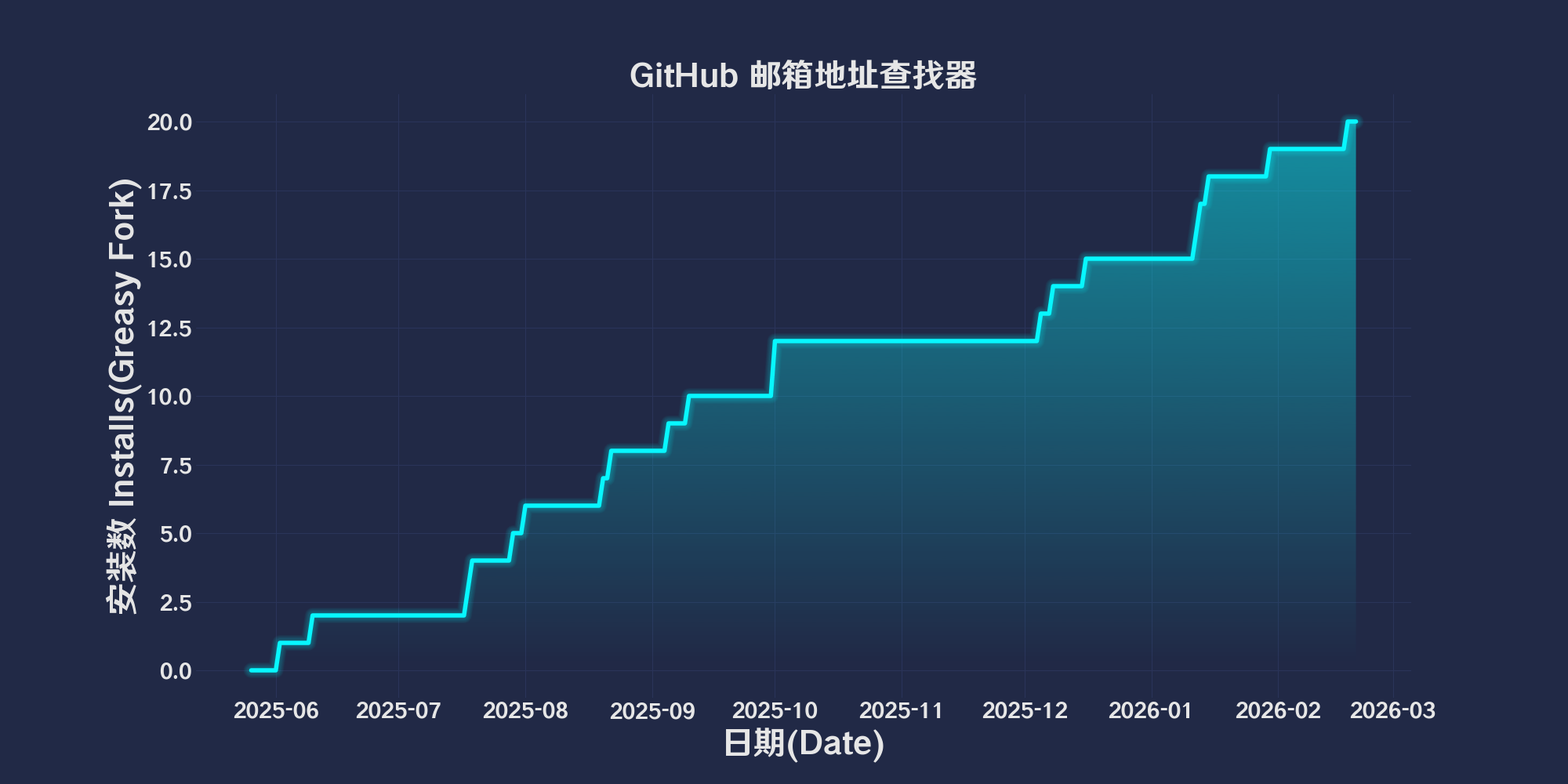
Dagelijks aantal installaties
0
Totaal aantal installaties
15
Beoordelingen
0 0 0
Versie
2025.5.26.1
Gemaakt op
26-05-2025
Bijgewerkt op
26-05-2025
Grootte
86,1 KB
Comptabiliteit
Compatibel met Firefox Compatibel met Chrome Compatibel met Opera Compatibel met Safari Compatibel met Edge
Licentie
MIT
Wordt toegepast op

简体中文 | English | 한국어 | Tiếng Việt | 繁體中文

👆️access GitHub Readme file on for a better experience。

Recommended use:
Support
Support
Support
💡 Tip: The script manager and browser listed above do not represent all
The script runs normally in the following environment
Passed

GitHub Email Address Finder

「 Use public event data (for example, a submission pushed to a public code base), get the user’s submission email address and display it on the profile page. In addition, it also adds a convenient "Copy to Clipboard" button for easy copying. 」

Views

Download:Github | ⭐Greasy Fork

Github Email Finder (Alpha)

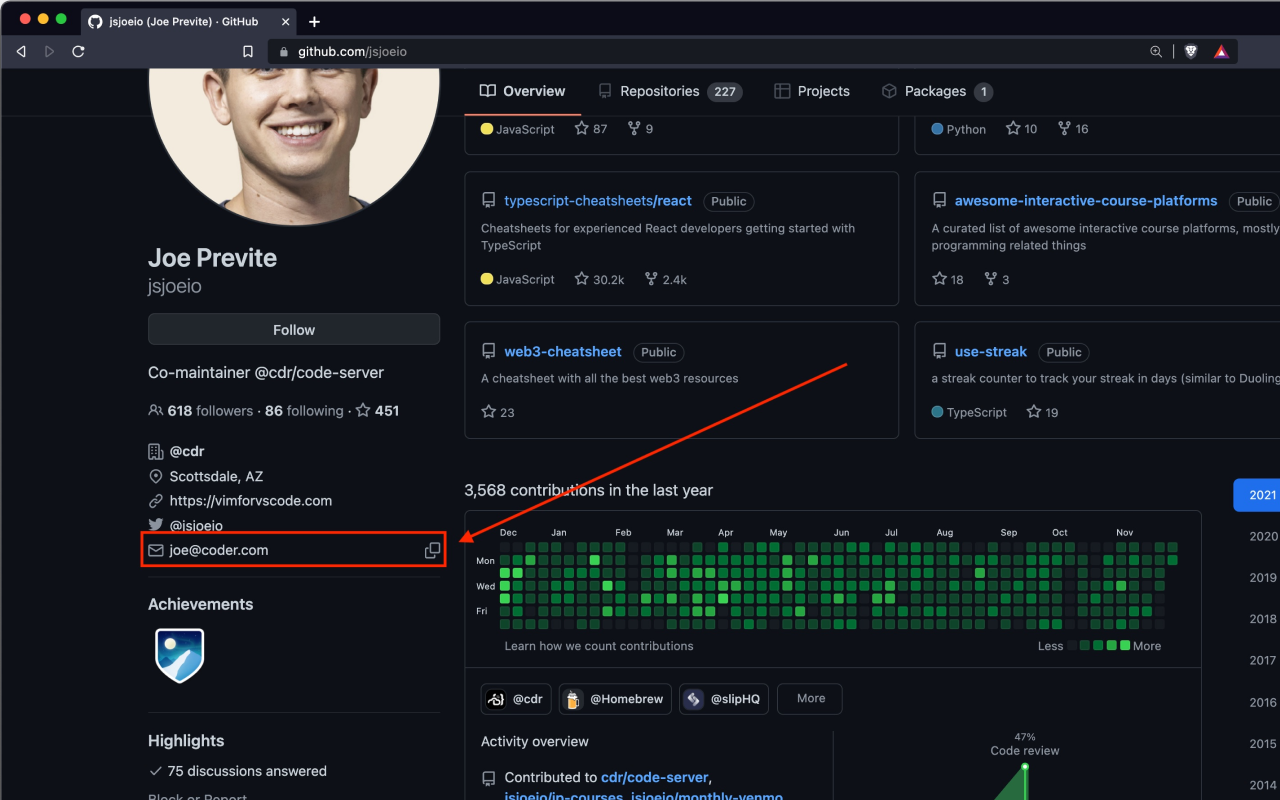
This script is used in GitHub User homepage automatically extracts user public submissions(PushEvent)Email address in(If there is no public email address,),And insert the email information into the page,It also provides the function of copying email to the clipboard with one click。

Functional Overview

  • Check whether the email information is displayed on the current page。
  • If not,from GitHub API Obtain user public event data,Extract the most recent PushEvent Submit email in。
  • Insert the extracted email into the contact information area of ​​the user profile page。
  • Insert a clipboard icon next to the mailbox,Click to copy the email to the clipboard。
  • After successful copying,The clipboard icon will be replaced with a tick icon,Prompt copying successfully。

Instructions for use

  1. Make sure the configuration is valid GitHub Personal access token(GITHUB_TOKENHereGenerate a new token,To avoid API Request restrictions。
Notice

  • This script does not obtain an accurate email address,It is the email address of the submitter,Probably not the user’s registration email。(For example, the email address in the merge request,Then the email address displayed is the email address of the initiator of the merge request)
  • This script is currently in testing,There are some problems。

💖 The script referenced or used the following script:

GitHub Email Extension

2025.05.26

Help

Recommended browser and script manager:

  • Greasemonkey + Waterfox
  • Tampermonkey/Violentmonkey + Firefox
  • Tampermonkey/Violentmonkey + Chrome
  • Userscripts + ios Safari
  • Violentmonkey/KiWiBrowser + Android

If you need to learn more about how to install user scripts,Click meView the teaching of pictures and texts!

View all publish scripts