RoLocate

Adds filter options to roblox server page. Alternative to paid extensions like RoPro, RoGold®, RoQol, and RoKit.

Чтобы установить этот скрипт, вы сначала должны установить расширение браузера, например Tampermonkey, Greasemonkey или Violentmonkey.

Для установки этого скрипта вам необходимо установить расширение, такое как Tampermonkey.

Чтобы установить этот скрипт, вы сначала должны установить расширение браузера, например Tampermonkey или Violentmonkey.

Чтобы установить этот скрипт, вы сначала должны установить расширение браузера, например Tampermonkey или Userscripts.

Чтобы установить этот скрипт, сначала вы должны установить расширение браузера, например Tampermonkey.

Чтобы установить этот скрипт, вы должны установить расширение — менеджер скриптов.

(у меня уже есть менеджер скриптов, дайте мне установить скрипт!)

Чтобы установить этот стиль, сначала вы должны установить расширение браузера, например Stylus.

Чтобы установить этот стиль, сначала вы должны установить расширение браузера, например Stylus.

Чтобы установить этот стиль, сначала вы должны установить расширение браузера, например Stylus.

Чтобы установить этот стиль, сначала вы должны установить расширение — менеджер стилей.

Чтобы установить этот стиль, сначала вы должны установить расширение — менеджер стилей.

Чтобы установить этот стиль, сначала вы должны установить расширение — менеджер стилей.

(у меня уже есть менеджер стилей, дайте мне установить скрипт!)

Автор
Oqarshi
Установок в день
50
Всего установок
9 995
Оценки
36 23 7
Версия
44.5
Создано
14.01.2025
Обновлено
31.12.2025
Размер
743,1 КБ
Лицензия
Custom - Personal Use Only
Работает на
RoLocate Logo

🌍 RoLocate

Free Roblox Server Filtering
A powerful, 100% free alternative to paid Roblox extensions.

Website Badge GreasyFork Badge License Badge Open Source Badge

Version 44.5 · Created & maintained by Oqarshi

Official Website · Report issue · View Source


🚨 IMPORTANT: Userscript Manager Required!

⚠️ BEFORE YOU CONTINUE: You MUST have a userscript manager installed to use RoLocate!

🔥 RECOMMENDED: Install Violentmonkey.

📍 If Violentmonkey is blocked, use ScriptCat.

⚠️ AVOID Tampermonkey – It can slow down server searching by up to 100×!


🌐 Official Website & Credits

🔗 RoLocate Official Page
🔗 RoLocate Source Code

🚨 GreasyFork and the GitHub repository are the only official sources to install RoLocate. Do not trust third-party versions or reuploads.


🧠 What is RoLocate?

RoLocate is a Roblox userscript providing features like server filtering and SmartSearch to find the best servers faster.
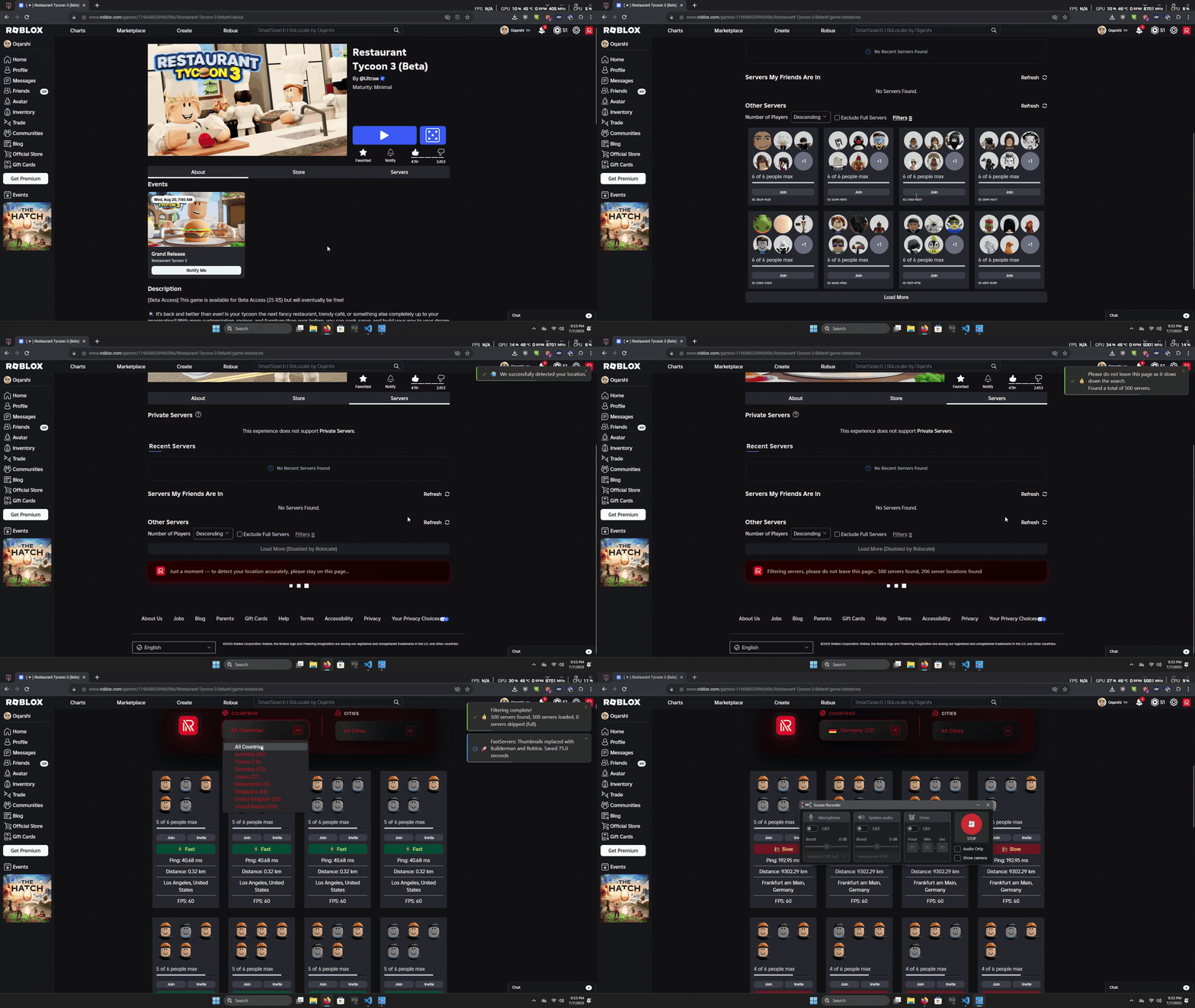
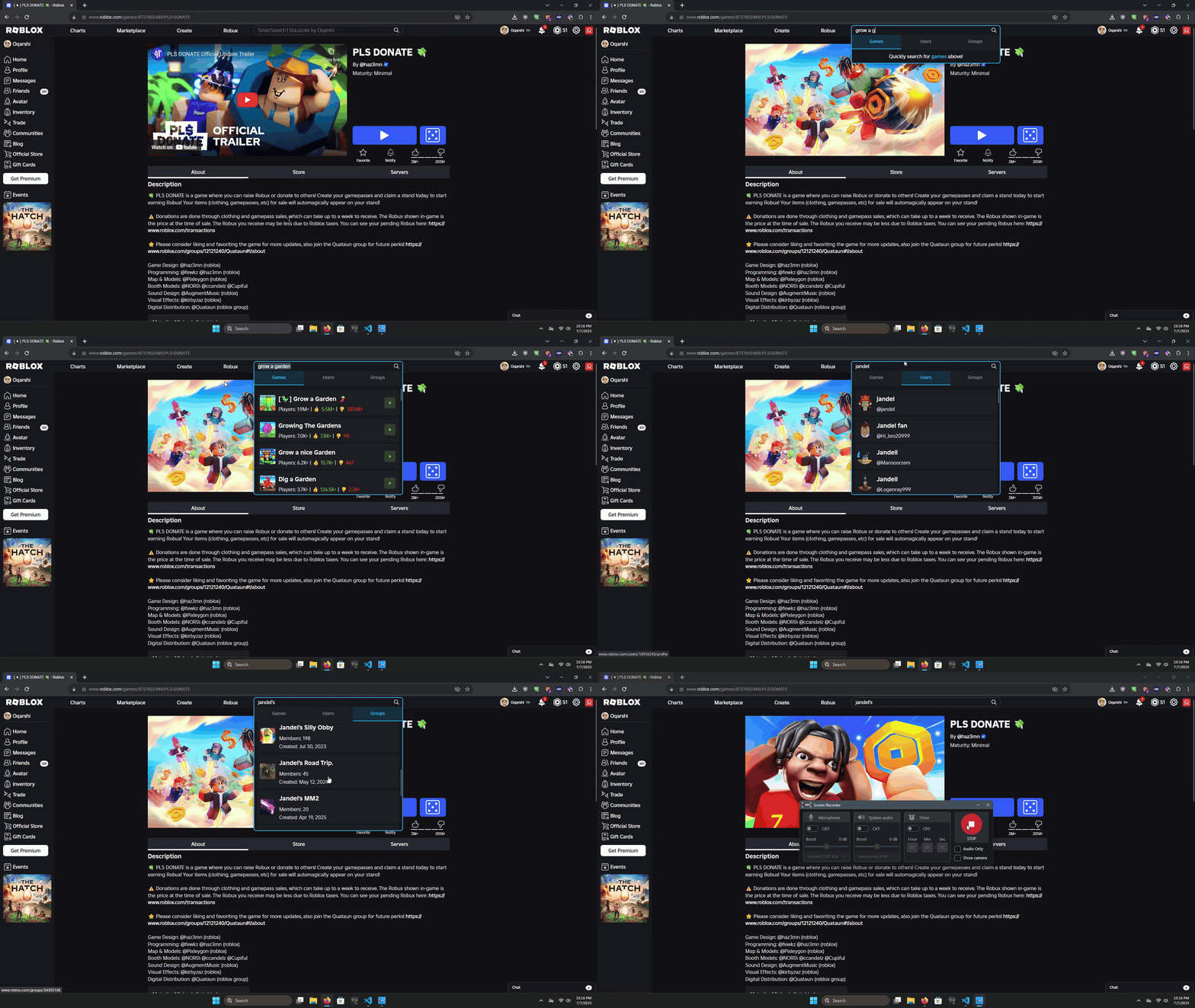
🎥 Demo Previews

💡 Server Filter Demo

Server Filter Demo

💡 Smart Search Demo

Smart Search Demo


🚀 Features

⚙️ General Tab

  • 🔍 SmartSearch – Instantly search for games, users, and groups right from the Roblox search bar.
  • 🌍 Auto Server Regions – Shows enhanced servers with region and ping info.
  • ⚡ Fast Server Search – Loads server lists up to 100× faster by optimizing assets.
  • 🔄 Invert Player Count – View lowest or highest population servers first.
  • 🕓 Recent Servers – Quickly rejoin servers you’ve visited in the last 3 days.

🎨 Appearance Tab

  • 🎬 Disable Trailer Autoplay – Stops trailers from auto-playing.
  • 📍 Smart Join Popup – Shows server region and details before joining.
  • ❌ Remove Roblox Ads – Removes most ads across Roblox.
  • 🔄 Restore Classic Terms – Changes words like “Connections” → “Friends”.
  • 🧭 Quick Nav – Adds customizable navigation shortcuts.
  • 🖼️ Custom Backgrounds – Lets you style the Roblox site your way.

🚀 Advanced Tab

  • 🛠️ Enable Console Logs – See what the script’s doing in your browser console.
  • ✅ Enable Server Filters – Turn on the advanced filtering UI on game pages.
  • 🔁 Enable Server Hop Button – Instantly hop to a new game server.
  • 🔔 Enable Notifications – Get in-browser alerts for updates and actions.
  • 📌 Set Default Location – Manually choose a fallback region.

✨ Extra Tab

  • 🧹 Game Quality Filter – Hide low-quality games automatically.
  • 🧑‍🤝‍🧑 Mutual Friends – View mutual friends on user profiles.
  • 💬 Disable Chat – Completely remove chat from Roblox.
  • 🚀 Quick Launch Games – Start your favorite games instantly.
  • 👋 Show Old Greeting – Bring back the classic Roblox homepage greeting.
  • 👤 Better Friends – Redesigns the friends list and adds Best Friends.


📥 Installation

  1. Install Violentmonkey or ScriptCat.
  2. Install from GreasyFork.
  3. Click Install and confirm.
  4. Visit Roblox.


❓ FAQ

🔹 Does RoLocate work on all browsers?
Works on all major browsers except untested Safari.

🔹 Is RoLocate free?
Yes.

🔹 How do I update?
GreasyFork updates automatically.

🔹 I don’t see the filter button!
Refresh, reinstall, or check feedback page.

🔹 Can I use RoLocate on mobile?
Yes, refer to this Video.

🔹 How does it find server locations?
Uses modified Roblox DevForum method.

🔹 My question isn’t answered here!
Troubleshooting Page.


🔮 Upcoming Features

  • 📊 Live Player Count Updates
  • 🌐 Preferred Region


📜 License

Custom License – Personal Use Only
You may use and modify for personal, non-commercial use only. No reuploading or redistribution.


🎉 Enjoy RoLocate!


