GitHub E -mailová adresa

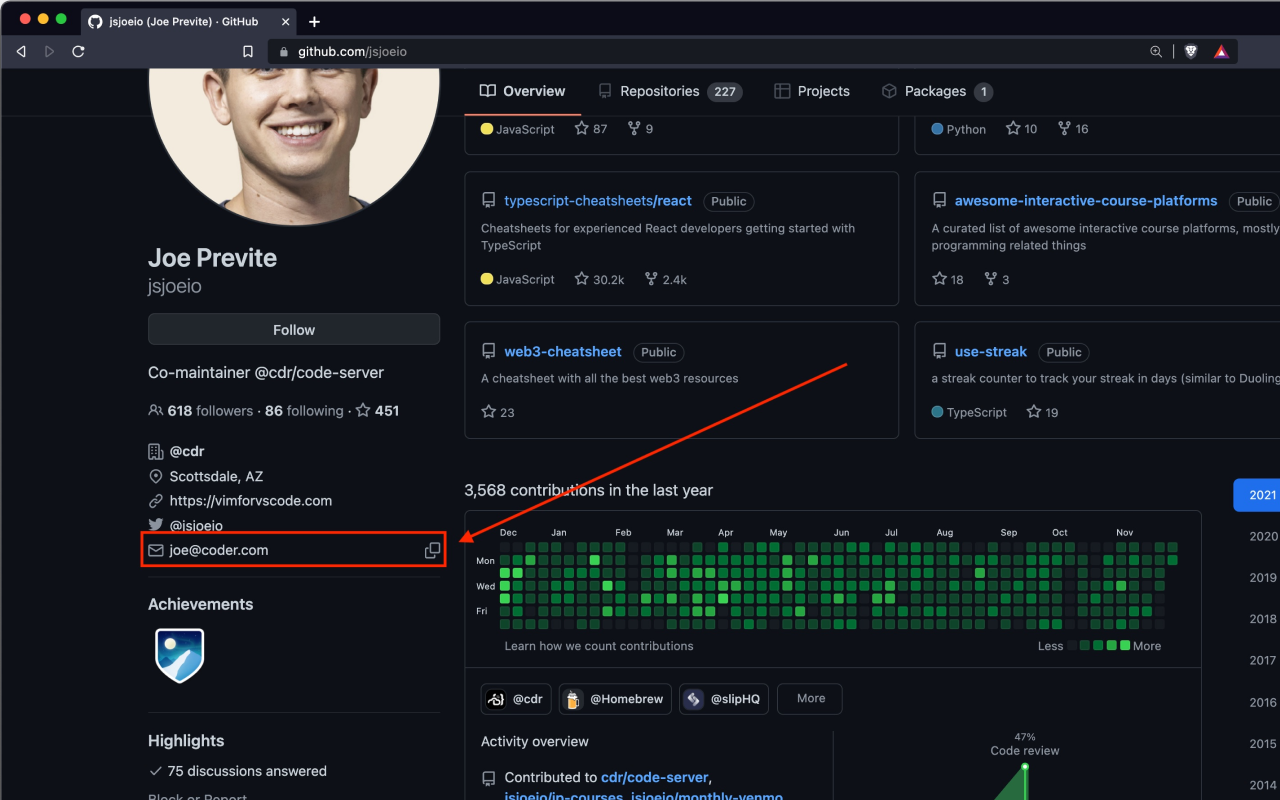
Použite údaje o verejných udalostiach (napríklad podanie tlačené na základňu verejného kódu), získajte e -mailovú adresu odoslania používateľa a zobrazte ich na stránke profilu. Okrem toho tiež pridáva pohodlné tlačidlo „Kopírovať do schránky“ na ľahké kopírovanie.


Na nainštalovanie skriptu si budete musieť nainštalovať rozšírenie, ako napríklad Tampermonkey, Greasemonkey alebo Violentmonkey.

Na inštaláciu tohto skriptu je potrebné nainštalovať rozšírenie, ako napríklad Tampermonkey.

Na nainštalovanie skriptu si budete musieť nainštalovať rozšírenie, ako napríklad Tampermonkey, % alebo Violentmonkey.

Na nainštalovanie skriptu si budete musieť nainštalovať rozšírenie, ako napríklad Tampermonkey alebo Userscripts.

Na inštaláciu tohto skriptu je potrebné nainštalovať rozšírenie, ako napríklad Tampermonkey.

Na inštaláciu tohto skriptu je potrebné nainštalovať rozšírenie správcu používateľských skriptov.

(Už mám správcu používateľských skriptov, nechajte ma ho nainštalovať!)

Na inštaláciu tohto štýlu je potrebné nainštalovať rozšírenie, ako napríklad Stylus.

Na inštaláciu tohto štýlu je potrebné nainštalovať rozšírenie, ako napríklad Stylus.

Na inštaláciu tohto štýlu je potrebné nainštalovať rozšírenie, ako napríklad Stylus.

Na inštaláciu tohto štýlu je potrebné nainštalovať rozšírenie správcu používateľských štýlov.

Na inštaláciu tohto štýlu je potrebné nainštalovať rozšírenie správcu používateľských štýlov.

Na inštaláciu tohto štýlu je potrebné nainštalovať rozšírenie správcu používateľských štýlov.

(Už mám správcu používateľských štýlov, nechajte ma ho nainštalovať!)

Autor
人民的勤务员
Denne inštalácií
0
Celkový počet inštalácií
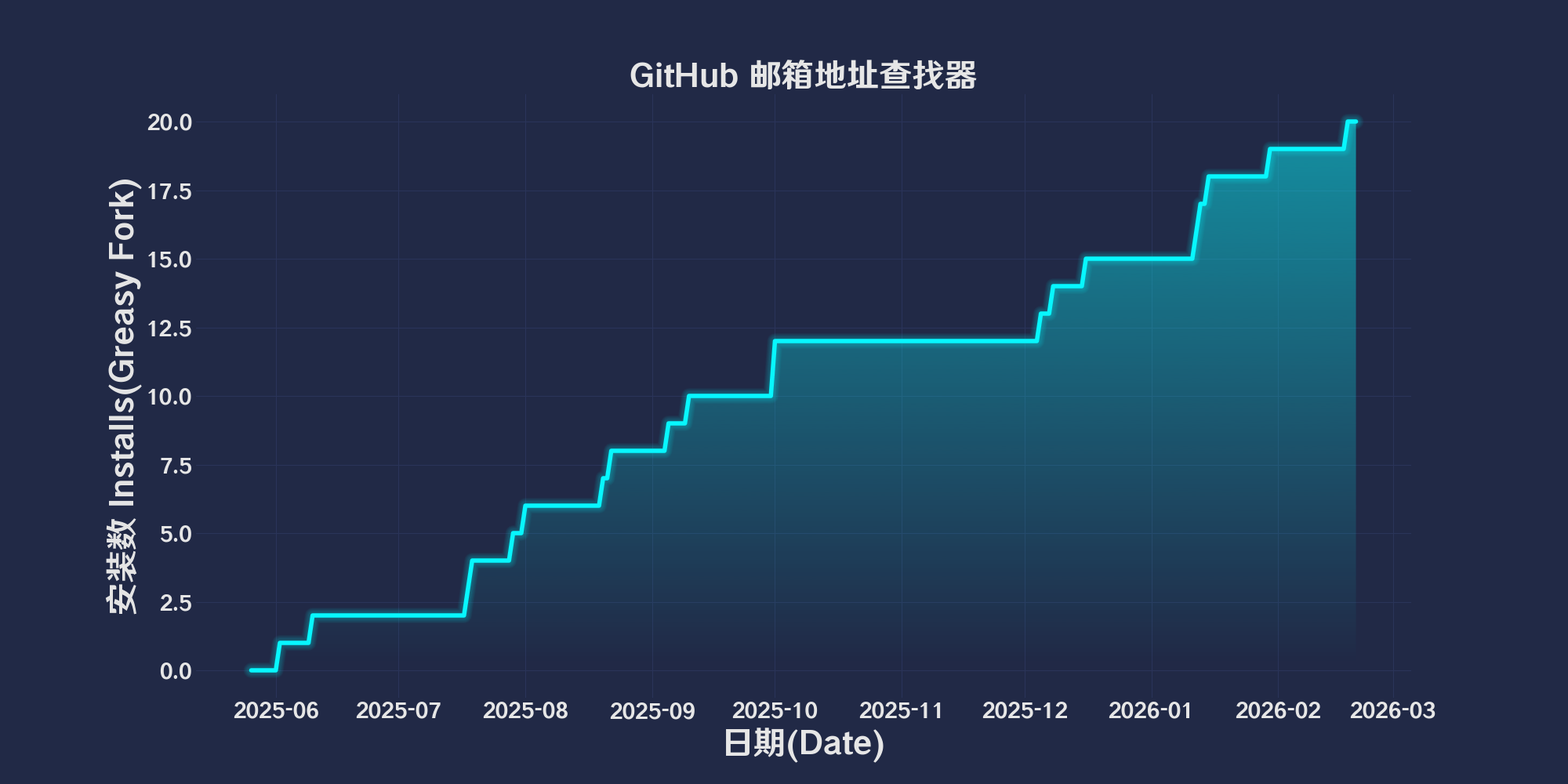
15
Hodnotenie
0 0 0
Verzia
2025.5.26.1
Vytvorené
26.05.2025
Aktualizované
26.05.2025
Veľkosť
86,1 KB
Kompatibilita
Kompatibilné s Firefox Kompatibilné s Chrome Kompatibilné s Opera Kompatibilné s Safari Kompatibilné s Edge
Licencia
MIT
Spustiť na

简体中文 | English | 한국어 | Tiếng Việt | 繁體中文

👆️access GitHub Readme file on for a better experience。

Recommended use:
Support
Support
Support
💡 Tip: The script manager and browser listed above do not represent all
The script runs normally in the following environment
Passed

GitHub Email Address Finder

「 Use public event data (for example, a submission pushed to a public code base), get the user’s submission email address and display it on the profile page. In addition, it also adds a convenient "Copy to Clipboard" button for easy copying. 」

Views

Download:Github | ⭐Greasy Fork

Github Email Finder (Alpha)

This script is used in GitHub User homepage automatically extracts user public submissions(PushEvent)Email address in(If there is no public email address,),And insert the email information into the page,It also provides the function of copying email to the clipboard with one click。

Functional Overview

  • Check whether the email information is displayed on the current page。
  • If not,from GitHub API Obtain user public event data,Extract the most recent PushEvent Submit email in。
  • Insert the extracted email into the contact information area of ​​the user profile page。
  • Insert a clipboard icon next to the mailbox,Click to copy the email to the clipboard。
  • After successful copying,The clipboard icon will be replaced with a tick icon,Prompt copying successfully。

Instructions for use

  1. Make sure the configuration is valid GitHub Personal access token(GITHUB_TOKENHereGenerate a new token,To avoid API Request restrictions。
Notice

  • This script does not obtain an accurate email address,It is the email address of the submitter,Probably not the user’s registration email。(For example, the email address in the merge request,Then the email address displayed is the email address of the initiator of the merge request)
  • This script is currently in testing,There are some problems。

💖 The script referenced or used the following script:

GitHub Email Extension

2025.05.26

Help

Recommended browser and script manager:

  • Greasemonkey + Waterfox
  • Tampermonkey/Violentmonkey + Firefox
  • Tampermonkey/Violentmonkey + Chrome
  • Userscripts + ios Safari
  • Violentmonkey/KiWiBrowser + Android

If you need to learn more about how to install user scripts,Click meView the teaching of pictures and texts!

View all publish scripts