Torn Reminder Icons

Highlight status icons on Torn

You will need to install an extension such as Tampermonkey, Greasemonkey or Violentmonkey to install this script.

You will need to install an extension such as Tampermonkey to install this script.

You will need to install an extension such as Tampermonkey or Violentmonkey to install this script.

You will need to install an extension such as Tampermonkey or Userscripts to install this script.

You will need to install an extension such as Tampermonkey to install this script.

You will need to install a user script manager extension to install this script.

(I already have a user script manager, let me install it!)

You will need to install an extension such as Stylus to install this style.

You will need to install an extension such as Stylus to install this style.

You will need to install an extension such as Stylus to install this style.

You will need to install a user style manager extension to install this style.

You will need to install a user style manager extension to install this style.

You will need to install a user style manager extension to install this style.

(I already have a user style manager, let me install it!)

Autor
PedroXimenez
Dnevne instalacije
0
Ukupno instalacija
15
Ocene
0 0 0
Verzija
0.2
Napravljeno
30. 01. 2026
Ažurirano
30. 01. 2026
Size
20 КБ
Licenca
MIT
Važi za

Torn Reminder Icons

A userscript that highlights status icons in Torn when there's something you need to do.
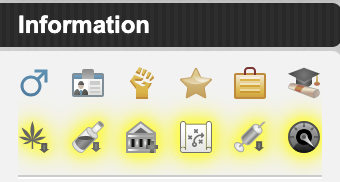
Highlighted reminder icons

When you're off cooldown for drugs, boosters, or medical items, or when you have a bank investment ready, education to start, an organized crime available - the relevant icon appears with a coloured glow so you don't miss it.

Features

  • Adds highlighted reminder icons when cooldowns are ready or actions are available
  • Makes existing drug, booster, and medical cooldown icons clickable - click them to go straight to your items
  • Configurable: choose which reminders to show, the highlight colour, and whether to use greyscale
  • Option to disable reminders while traveling

Installation

  1. Install a userscript manager like Tampermonkey or Greasemonkey
  2. Install the script from the .user.js file

Configuration

Open your userscript manager's menu and click "Configure Reminders":

Configuration menu

From there you can enable/disable individual reminders, change the highlight colour, toggle greyscale mode, and more.