GitHub Code Folding

A userscript that adds code folding to GitHub files

您需要先安装一款用户脚本管理器扩展,例如 Tampermonkey 篡改猴Greasemonkey 油猴子Violentmonkey 暴力猴,才能安装此脚本。

您需要先安装一款用户脚本管理器扩展,例如 Tampermonkey 篡改猴,才能安装此脚本。

您需要先安装一款用户脚本管理器扩展,例如 Tampermonkey 篡改猴Violentmonkey 暴力猴,才能安装此脚本。

您需要先安装一款用户脚本管理器扩展,例如 Tampermonkey 篡改猴Userscripts ,才能安装此脚本。

您需要先安装一款用户脚本管理器扩展,例如 Tampermonkey 篡改猴,才能安装此脚本。

您需要先安装一款用户脚本管理器扩展后才能安装此脚本。

(我已经安装了用户脚本管理器,让我安装!)

Advertisement:

您需要先安装一款用户样式管理器扩展,比如 Stylus,才能安装此样式。

您需要先安装一款用户样式管理器扩展,比如 Stylus,才能安装此样式。

您需要先安装一款用户样式管理器扩展,比如 Stylus,才能安装此样式。

您需要先安装一款用户样式管理器扩展后才能安装此样式。

您需要先安装一款用户样式管理器扩展后才能安装此样式。

您需要先安装一款用户样式管理器扩展后才能安装此样式。

(我已经安装了用户样式管理器,让我安装!)

Advertisement:

作者
Mottie
日安装量
1
总安装量
710
评分
13 0 1
版本
1.1.5
创建于
2016-12-29
更新于
2024-02-17
大小
7.8 KB
许可证
MIT
适用于

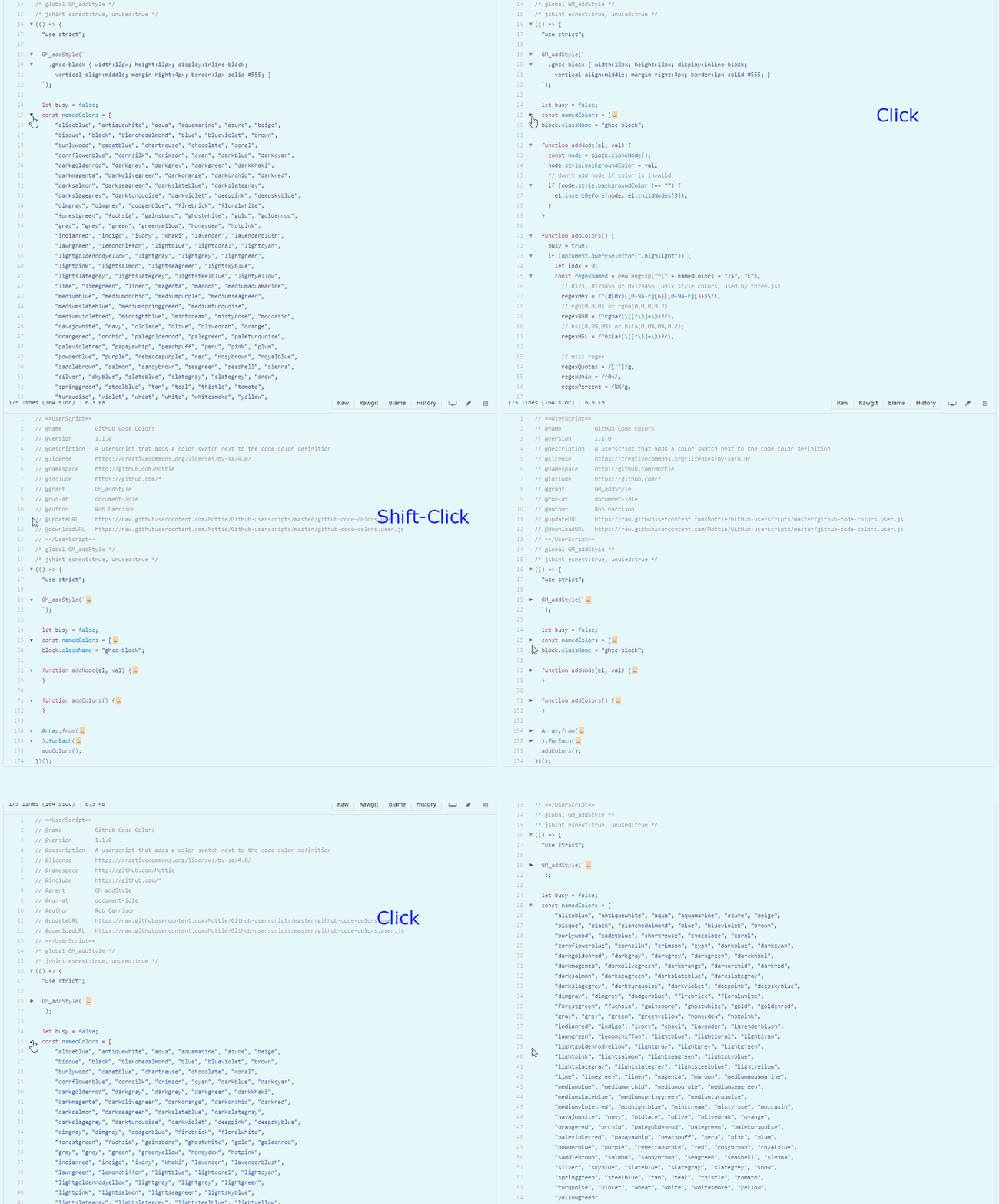
A userscript that adds code folding to GitHub files

  • This code only works on GitHub files (with line numbers), not in markdown code.
  • Works for both space and tab indentation.
  • This code was modified from the GitHub Code Folding Chrome extension by @noam3127 (MIT license).
  • Clicking on an arrow will collapse a section of code with the same indentation level.
  • Using Shift click on an arrow will collapse all sections of the same code indentation level.
  • After collapsing a code block, click on either the arrow (left side) or on the ellipsis (right side), to re-expand the code block.

github-code-folding

Hosted with ♥ at GitHub