
What are user scripts?
User scripts put you in control of your browsing experience. Once installed, they automatically make the sites you visit better by adding features, making them easier to use, or taking out the annoying bits. The user scripts on Greasy Fork were written by other users and posted to share with the world. They're free to install and easy to use.
Step 1: install a user script manager
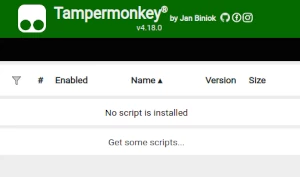
To use user scripts you need to first install a user script manager. Which user script manager you can use depends on which browser you use.
Desktop Mobile (Android) Mobile (iOS)
- Chrome: Tampermonkey
- Firefox: Greasemonkey, Tampermonkey, or Violentmonkey
- Safari: Tampermonkey or Userscripts
- Microsoft Edge: Tampermonkey
- Opera: Tampermonkey or Violentmonkey
- Maxthon: Violentmonkey
- AdGuard: (no additional software required)
- Firefox: Greasemonkey, Tampermonkey, or Violentmonkey
- Microsoft Edge: Tampermonkey
- Maxthon: Violentmonkey
- Dolphin: Tampermonkey
- UC: Tampermonkey
- XBrowser
- Safari: Tampermonkey or Userscripts
- Gear: (no additional software required)
- Teak: (no additional software required)
Step 2: install a user script
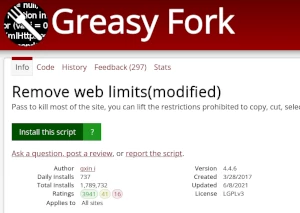
Browse this site to find a user script you want to try. Here is a sample of the most popular scripts:
- Toggleable (Key V) ESP for Shell Shockers (PROOF OF CONCEPT) - Only to be used for TESTING purposes, in private lobbies.
- Mga Estilo ng Moomoo - Moomoo.io/sploop.io mod [Texture Pack Editor/ Music Player/ Hat Keybinds/ Music Visualizer/ Skin Switcher/ Anti-Kick/ Auto Login]
- 超星学习通全能增强小帮手,自动化操作小帮手,题库查询,让学习更轻松高效 - 💻提供超星/学习通多项功能支持,全面增强💻。通提供以下内容:1、章节视频 2、课程作业 3、章节测验 4、智能题库对接。🔥简单高效,持续更新。
- Telegram Downloader (Pag-download ng video, Orihinal na larawan, I-compress, PNG) - Mag-download ng mga video at larawan mula sa mga pribadong channel. Sinusuportahan ang pag-download ng video, pag-save ng orihinal, at PNG para sa mga larawan.
- Universal Media Pro Toolkit | Video Download, Extract URL, Play - I-extract ang mga direktang URL ng video, madaling i-download ang media, at i-play sa isang click sa isang malinis, lumulutang na window.
Once you've found a user script, click the green install button on the user script's page, and your user script manager will ask you to confirm the install.
Step 3: use the user script
Go to the site the user script affects. It should automatically do its thing. After trying out the user script for a while, go back to where you installed the user script and leave some feedback for the user script's author.